Purchase Order Processing - Archived Purchase Requisition Inquiry
Function
The Archived Purchase Requisition Inquiry is a display-only form that provides lookup of archived Purchase Requisitions. The archive is a copy of each Purchase Requisition Entry, and is created when the Purchase Requisition is printed or copied into Purchase Order Entry.
To access this task...
Select Archived Purchase Requisition Inquiry from the Inquiry and Maintenance menu.
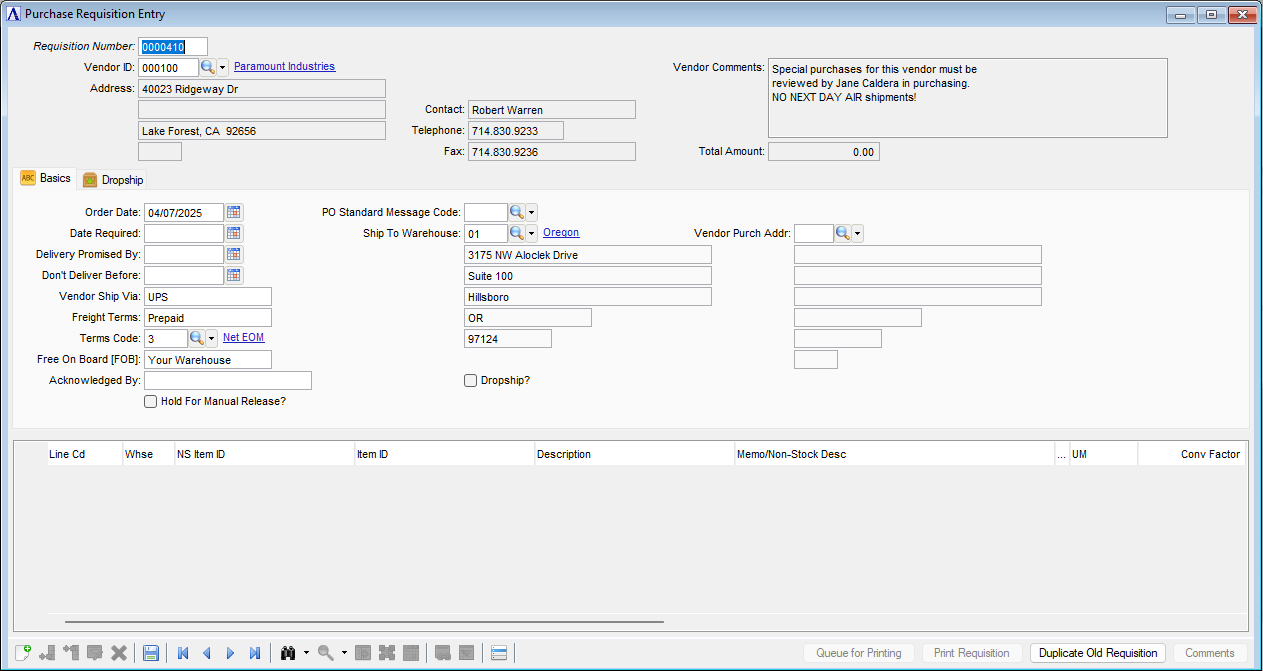
Purchase Requisition Entry
About the Fields
The Archived Purchase Requisition Inquiry form is divided into three sections: Vendor Information, Purchase Requisition Detail, and Item Detail.
The Vendor Information fields display the PO number, name, address, and purchase address of the vendor you select, along with the name, phone number, and fax number of the contact person for the vendor.
The Purchase Order Detail section includes shipping information, such as terms, dates, ship-to address, and so forth.
The Item Detail section displays detail lines of the purchase requisition.
In the Requisition Number field...
-
Enter a valid purchase requisition number.
-
Click the record navigating buttons:
 to view the first record,
  to view the previous record,
  to view the next record, and
  to view the last record.
 -
Click
 to select from a list of archived purchase orders.
Print Requisition Button
Click the Print Requisition button to print the archived purchase requisition. A print preview version of the purchase order is created.