Sales Order Processing - Fulfillment Report
Function
Use this report to identify:
-
Open orders that are in Order Fulfillment and are ready be invoiced
-
Open orders that are in Order Fulfillment and are NOT ready to be invoiced
-
Open orders that are NOT in Order Fulfillment
To access this task...
Select Fulfillment Report from the Sales Order Processing menu.
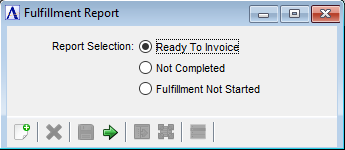
Fulfillment Report
About the Fields
Ready To Invoice radio button...
-
Select the Ready to Invoice radio button to print a report of open orders in Order Fulfillment that are ready to be invoiced.
NOTE:
When closing this report, the user will have an opportunity to push all of the open orders in the report to Invoice Entry.
Not Completed radio button...
-
Select the Not Completed radio button to print a report of open orders in Order Fulfillment that are NOT completed and are NOT ready to be invoiced.
Fulfillment Not Started radio button...
-
Select the Fulfillment Not Started radio button to print a report of open orders that are NOT in Order Fulfillment.
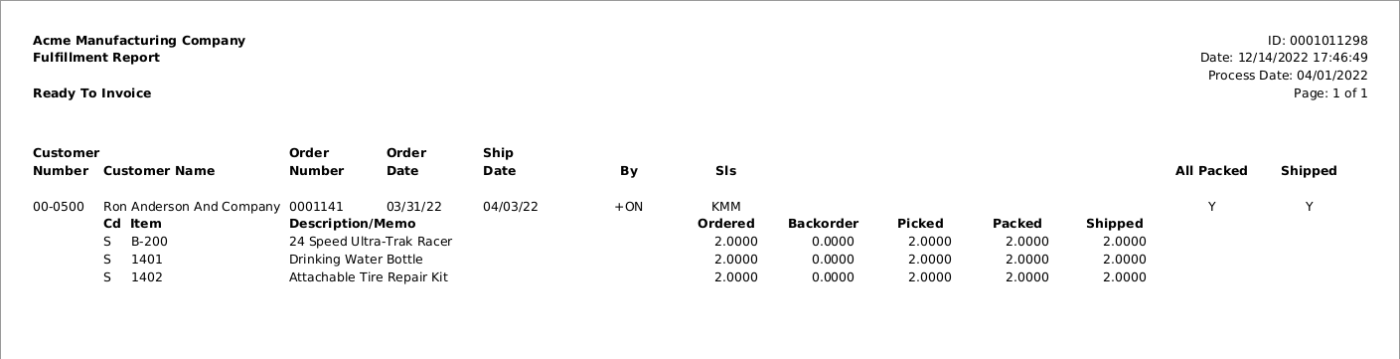
Sample Ready To Invoice Fulfillment Report