Inventory Control - Inventory Turns Report
Function
Use this task to create a report showing the total usage, total cost, average on hand, average value, and turns of inventory for the last 12 periods. The report may be created for a single warehouse and list items within a specific warehouse or product category.
To access this task...
Select Inventory Turns Report from the Reports menu.
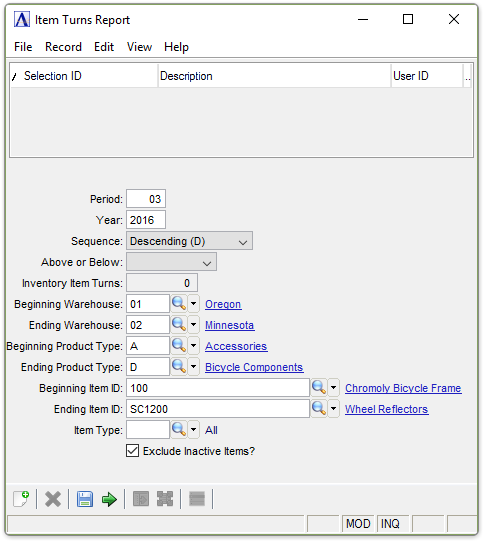
Item Turns Report
About the Fields
In the Period field...
-
Enter the period on which to base the report.
-
Press Tab to accept defaults as displayed.
In the Year field...
-
Enter the year of the period turns are annualized.
From the Sequence dropdown...
-
Select Ascending (A) to list the inventory items in ascending order.
-
Select Descending (D) to list the inventory items in descending order.
From the Above or Below dropdown...
-
Select Above (A) to list the items above a certain number of turns.
-
Select Below (B) fo list the items below a certain number of turns.
In the Inventory Item Turns field...
Field is active with a selection of Above or Below.
-
Enter the number of turns for the inventory.
In the Beginning/Ending Warehouse field...
-
Enter the code of the first/last warehouse to include on the report.
-
Press Tab to select the first/last warehouse code record.
-
Click
 to
select from a list of warehouse codes.
to
select from a list of warehouse codes.
In the Beginning/Ending Product Type field...
-
Enter the type of the first/last product to include on the report.
-
Press Tab to select the first/last product type record.
-
Click
to select from a list of product types.
In the Beginning/Ending Item ID field...
-
Enter the number of the first/last item to include on the report.
-
Press Tab to select the first/last item number record.
-
Click
to
select from a list of item numbers.
In the Item Type field...
-
Enter the item type to include on the report.
-
Press Tab to select all item types.
-
Click
to
select from a list of item types.
Exclude Inactive Items? checkbox...
-
Mark the box (default) to exclude inactive items.
-
Unmark the box to include all items.
When done making selections...
-
Click
 to create the report.
 -
Click
 to clear the form and start over.
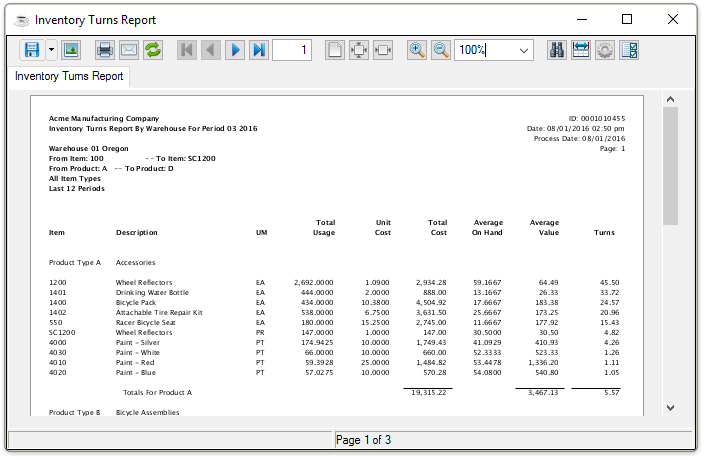
Sample Inventory Turns Report
See Output Options.