Inventory Control - Inventory Activity Report
Function
Use this task to create a report showing the activity of all inventory items, or for items at selected locations. You can select items for the report from within a specific warehouse or product category and for a specific period.
To access this task...
Select Inventory Activity Report from the Reports menu.
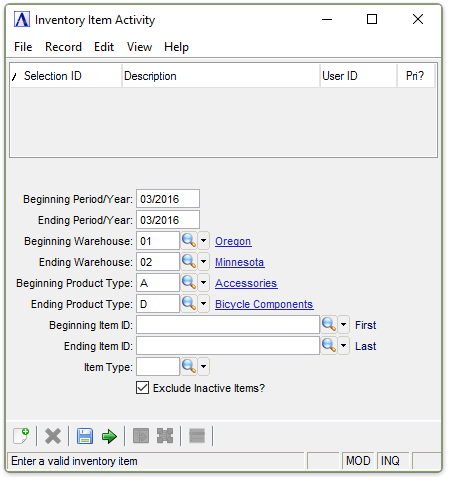
Inventory Item Activity menu
About the Fields
In the Beginning/Ending Period/Year field...
-
Enter the first/last period/Year <MM/YYYY> to include on the report.
In the Beginning/Ending Warehouse field...
-
Enter the coder of the first/last warehouse to include on the report.
-
Press Tab to select the first/last warehouse number record.
-
Click
 to
select from a list of warehouse numbers.
to
select from a list of warehouse numbers.
In the Beginning/Ending Product Type field...
-
Enter the type of the first/last product to include on the report.
-
Press Tab to select the first/last product type record.
-
Click
to
select from a list of product types.
In the Beginning/Ending Item ID field...
-
Enter the number of the first/last item to include on the report.
-
Press Tab to select the first/last item number record.
-
Click
to select from a list of item numbers.
In the Item Type field...
-
Enter the item type to include on the report.
-
Press Tab to select all item types.
-
Click
to
select from a list of item types.
Exclude Inactive Items? checkbox...
-
Mark the box (default) to exclude inactive items.
-
Unmark the box to include all items.
When finished making selections...
-
Click
 to create the report.
 -
Click
 to clear the form and re-enter options.
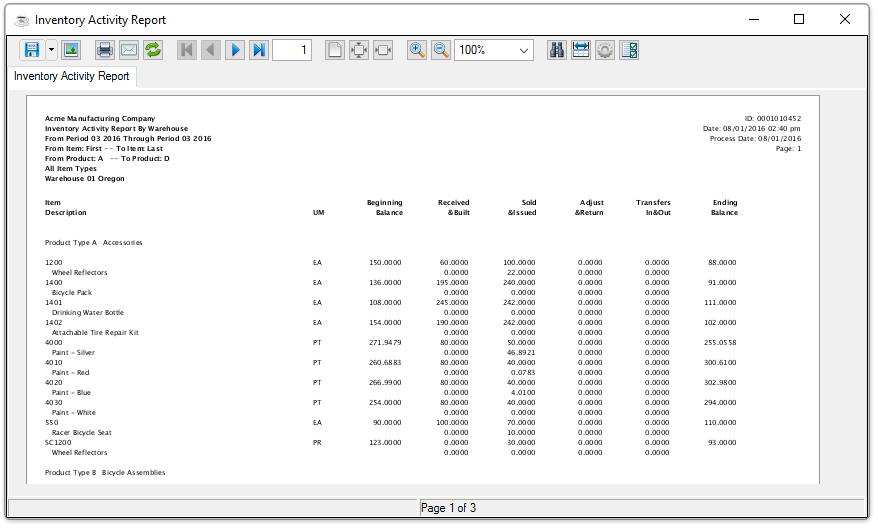
Sample Inventory Activity Report
See Output Options.