Inventory Control - EOQ, Order Point, Safety Stock Report
Function
Use this task to create a list of all inventory items showing the old EOQ, order point and safety stock amounts. The report displays the new EOQ, order point and safety stock quantities are calculated and updated to the Inventory Master File.
To access this task...
Select EOQ, Order Point, Safety Stock Report from the Period End Processing menu.
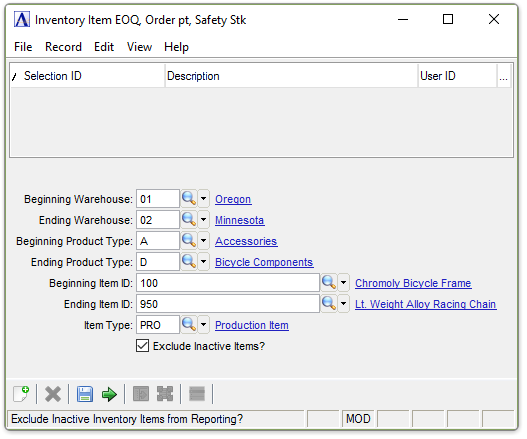
EOQ, Order Point, Safety Stock Report
About the Fields
In the Beginning/Ending Warehouse field...
-
Enter the code of the first/last warehouse to include on the report.
-
Press Tab to select the first/last warehouse number record.
-
Click
 to
select from a list of warehouse numbers.
to
select from a list of warehouse numbers.
In the Beginning/Ending Product Type field...
-
Enter the type of the first/last product to include on the report.
-
Press Tab to select the first/last product type record.
-
Click
to
select from a list of product types.
In the Beginning/Ending Item ID field...
-
Enter the number of the first/last item to include on the report.
-
Press Tab to select the first/last item number record.
-
Click
to
select from a list of item numbers.
In the Item Type field...
-
Enter the item type to include on the report.
-
Press Tab to select all item types.
-
Click
to
select from a list of item types.
Exclude Inactive Items? checkbox...
-
Mark the box (default) to exclude inactive items.
-
Unmark the box to include all items.
When done making selections...
-
Click
 to create the EOQ, Order Point, Safety Stock Report.
 -
Click
 to clear the form and re-enter options.
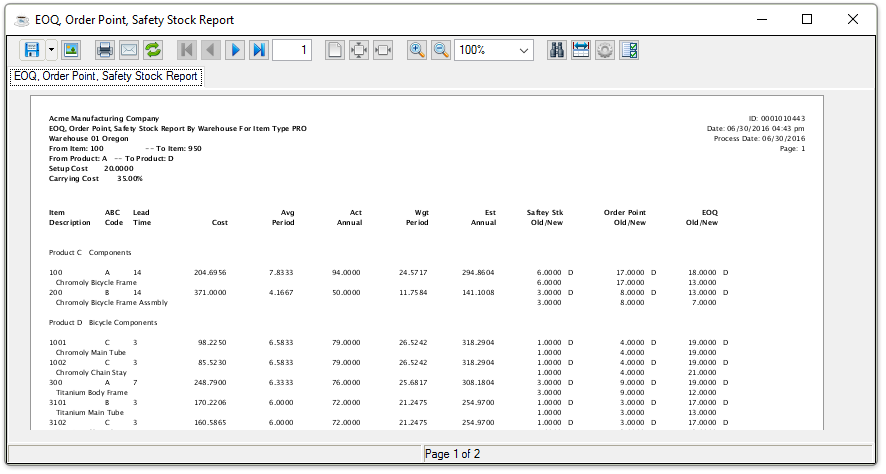
Sample EOQ, Order Point, Safety Stock Report
See Output Options.
When closing or saving the preview report, the system displays the prompt:
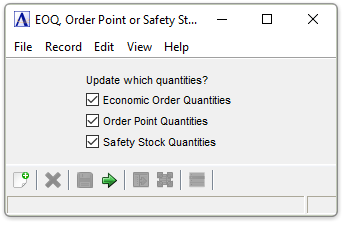
Update Quantities selection
The EOQ is the optimum quantity to be ordered each time you place an order. It is determined based on the fixed costs of setting up or placing and receiving an order, annual sales in units, carrying costs, and per unit purchase price.
Order Point Quantities calculates the level of inventory at which a new order should be placed based upon average sales andlead time. Order point is defined as the demand during lead time plus safety stock.
Safety Stock Quantities calculates the amount of additional inventory that should be carried to hedge against variations in demand during lead time. Safety stock is determined as 50% of usage during lead time.
When done making selections...
-
Click
to update the quantities. -
Click
to clear the form and re-enter options.