General Ledger - Cycle Codes
Function
Use this task to create, maintain, or modify cycle codes. Cycle codes are used in recurring journal entries to select specific transactions. Codes can be assigned any period length. A printed list of all codes is available.
To access this task...
Select Cycle Codes from the Inquiry and Maintenance menu.
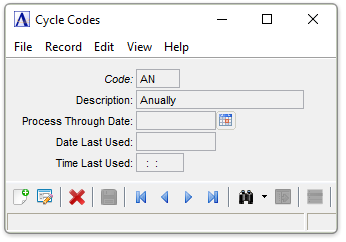
Journal Entry Cycle Codes
About the Fields
To enable edits to the form select  .
.
In the Code field...
-
Enter a new or existing two-character code.
-
Click
 to select from a list of all valid
codes.
to select from a list of all valid
codes. -
Click the record navigating buttons;
 to view the first record,
  to view the previous record,
  to view the next record, and
  to view the last record.
When entering a code already defined, the description and entry type will appear. It may then be changed, if necessary.
In the Description field...
-
Enter a description of the code up to 20-characters in length.
In the Process Through Date field...
-
Enter the last date that this code should be used. This can be used to limit the use of a recurring journal entry to a limited period of time.
-
Click
 to select a date using the calendar tool.
In the Date Last Used field...
Display only. Shows the date when this code was last used.
In the Time Last Used field...
Display only. Shows the time when this code was last used.
The system issues this prompt:
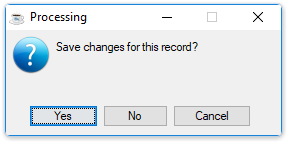
Save changes for this record?
-
Click Yes to save the current record and return to Maintenance Menu.
-
Click No to return to the Journal Entry Cycle Codes without saving the current record.
-
Click Cancel or the "Close Window" button.
When done making selections...
-
Click
 to save the new code.
 -
Click
 to clear the form and begin again.