Bill of Materials - Hard Copy Printing
The Hard Copy printing task is accessed from the Display additional options dropdown from the Bill of Materials Masters task in Maintenance.
Function
This option prints all information for a selected bill number. An asterisk (*) next to the component item number on the printed form indicates a bill number.
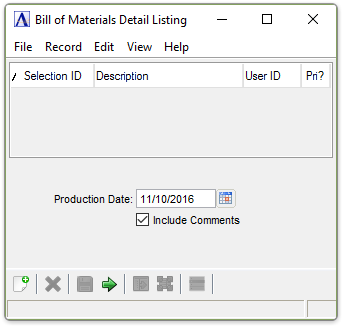
Bill of Materials A listing of materials, operations, and subcontracts used to describe the manufacture of an item. Detail Listing
About the Fields
In the Production Date field...
The production date entered is used in conjunction with the effective and obsolete dates entered for materials, operations, and subcontracts, to determine which items are to be included on the report.
-
Enter the date of production.
-
Click
 to select a date.
-
Press Tab key to accept the default date – current date.
Include Comments checkbox...
-
Mark the box to include all comments associated with the listing. The default is checked
-
Unmark the box to exclude the comments.
When finished making entries to the fields...
-
Click
 to create the report.
 -
Click
 to clear the form and begin again.
 -
Click
 to
save the selections.
to
save the selections.
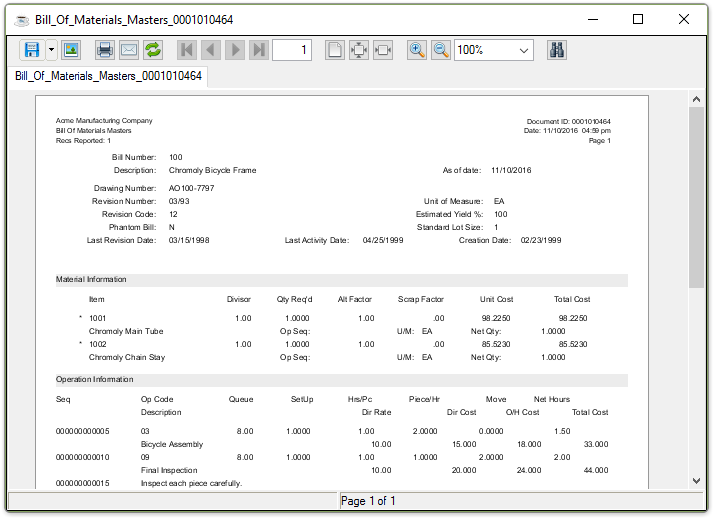
Sample Bill of Materials Detail Listing report
See Output Options.