Bill of Materials - Indented Bills
Function
The Indented
Bill of Materials A listing of materials, operations, and subcontracts used to describe the manufacture of an item. Report
is a listing of all levels of a bill or a range
of bill numbers, including the cost of materials, operations, and subcontracts.
This report helps in quality control, and can be run on demand with options
of up to nine levels. Cost information can be included or excluded.
A listing of materials, operations, and subcontracts used to describe the manufacture of an item. Report
is a listing of all levels of a bill or a range
of bill numbers, including the cost of materials, operations, and subcontracts.
This report helps in quality control, and can be run on demand with options
of up to nine levels. Cost information can be included or excluded.
To access this task...
Select Bill of Materials Indented Bills from the Reports menu.
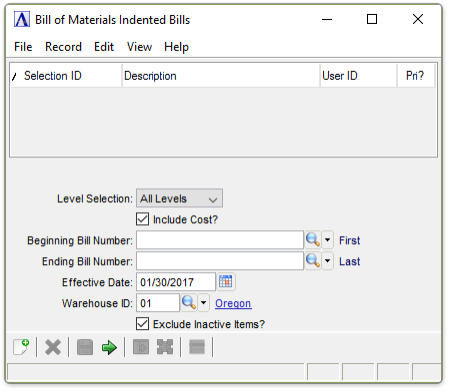
Indented Bill of Materials Report
About the Fields
From the Level Selection dropdown...
-
Press Tab or Enter to accept the default of All Levels.
-
Use the dropdown tool to select a level between 1 and 9.
Include Cost? checkbox...
-
Mark the box to include the material, operation, and subcontract costs on the report.
-
Unmark the box to exclude the cost information.
In the Beginning/Ending Bill Number field...
-
Enter the first/last bill number to appear on the report.
-
Press Tab or Enter to accept the default of first/last bill numbers.
-
Click
 to select from a list
of bills of materials.
to select from a list
of bills of materials.
In the Effective Date field...
-
Press Tab or Enter to accept the default of today’s date.
-
Click
 to select a date using the calendar tool.
In the Warehouse ID field...
-
Press Tab or Enter to accept the default.
-
Click
to select from a list of valid warehouse IDs.
Exclude Inactive Items? checkbox...
-
Mark the box (default) to exclude inactive items.
-
Unmark the box to include all items.
When finished making entries to the fields...
-
Click
 to process the report.
 -
Click
 to clear the form and begin again.
 -
Click
 to save the report settings.
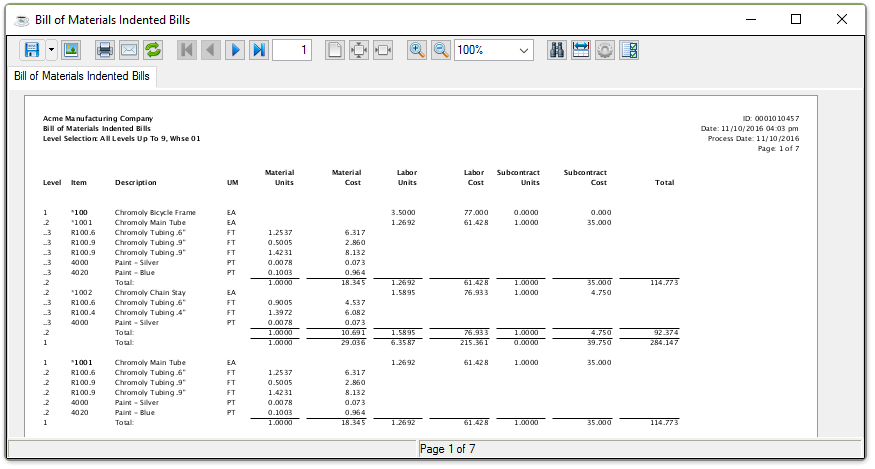
Sample Bill of Materials Indented Bills report
See Output Options.