Bill of Materials - Availability Inquiry
The Availability Inquiry task is accessed from the Display additional options dropdown from the Bill of Materials Masters task in Inquiry and Maintenance
Function
Displays and prints component quantities that are required, on hand, committed, available, or on order; based on the specified demand quantity for the selected warehouse.
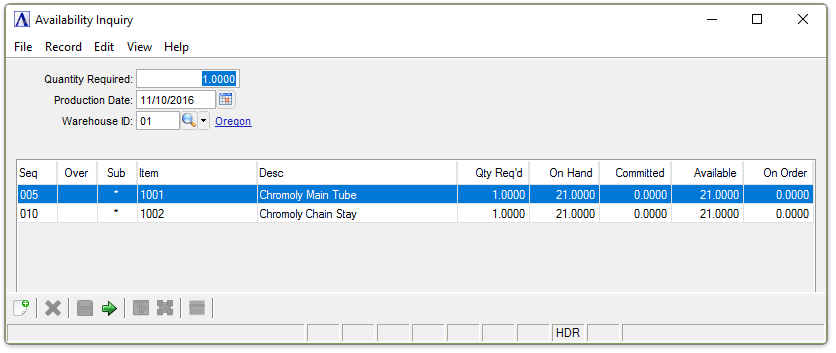
Availability Inquiry
About the Fields
In the Quantity Required field...
-
Enter the number of units needed for the order/quote.
In the Production Date field...
The production date will be used in conjunction with the effective and obsolete dates to determine the availability information on that date.
-
Enter the date for production.
-
Click
 to select a data.
 -
Press Tab key to accept the default date – current date.
In the Warehouse ID field...
-
Enter a valid warehouse number for material availability.
-
Click
 to select from a list of warehouse codes.
A list of all materials available at the warehouse is displayed, showing the material’s sequence number, a description of the material, how many required, how many on hand, how many committed, how many available, and how many on order.
NOTE:
An asterisk (*) next to the component item number indicates a bill number, and two asterisks (**) between the sequence number and the warehouse code indicate a material shortage for this item.
When done making selections...
-
Click
 to exit the form.
 -
Click
 to clear the form and begin
again.
to clear the form and begin
again. -
Click
 to save the selections.