Accounts Receivable - Monthly Cash Receipts Journal
Function
The Monthly Cash Receipts Journal task prints a detailed report of selected cash receipts in customer number sequence for a selected time period. A general ledger recap of all transactions is available.
To access this task...
Select Monthly Cash Receipts Journal from the Period End Processing main menu.
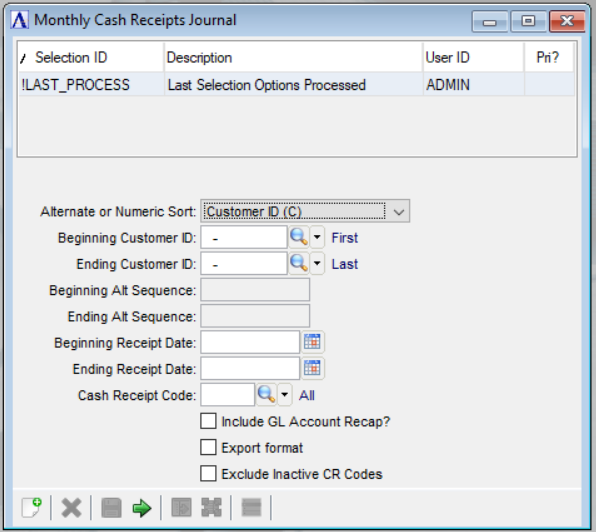
Monthly Cash Receipts Journal
About the Fields
From the Alternate or Numeric Sort dropdown...
-
Select Alternate Sequence (A) to print the journal in alphabetic order.
-
Select Customer ID (C) to print the journal by customer number.
In the Beginning/Ending Customer ID field...
Field is active when Customer ID (C) is selected in the Alternate or Numeric Sort step. Enter a valid customer number.
-
Press Enter to select the first/last customer number on file.
-
Click
 to select from a list of all valid customers
numbers.
to select from a list of all valid customers
numbers.
In the Beginning/Ending Alt Sequence field...
Field is active when Alternate Sequence (A) is selected in the Alternate or Numeric Sort step. Enter a letter to begin customer name listing in alphabetic order.
-
Press Enter to begin with the first/last customer number on file.
In the Beginning/Ending Receipt Date field...
-
Click
 to use the calendar tool to enter
the receipt date from which you want to start/end printing the Cash
Receipts Journal.
to use the calendar tool to enter
the receipt date from which you want to start/end printing the Cash
Receipts Journal. -
Press Enter to start with the first/last possible date.
In the Cash Receipt Code field...
-
Enter a valid cash receipt code.
-
Press Enter to select all codes.
-
Click
to select from a list of all valid codes.
Include GL Account Recap? checkbox...
-
Mark the box to include GL Account Recap on the report.
-
Unmark the box to not include the recap.
Export Format checkbox...
-
Mark the box to show the printed report in columnar format.
-
Unmark the box to show in non-columnar format.
Exclude Inactive CR Codes checkbox...
-
Mark the box to exclude display of Inactive Cash Receipt Codes on the report.
-
Unmark the box to show all Cash Receipt Codes on the report.
When done making selections:
-
Click
 when all information is correct
and proceed with Monthly Cash Receipts
Journal report printing.
when all information is correct
and proceed with Monthly Cash Receipts
Journal report printing. -
Click
 to begin new Monthly
Cash Receipts Journal.
to begin new Monthly
Cash Receipts Journal. -
Click
 to save the invoice printing details.
Attempting to leave an unsaved Monthly
Cash Receipts Journal by clicking causes
the module to issue this confirmation:
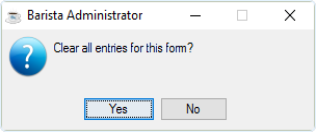
Clear all entries for this form?
-
Click Yes to clear the form and re-enter selection information.
-
Click No or the "Close Window" button to return to the form without clearing.
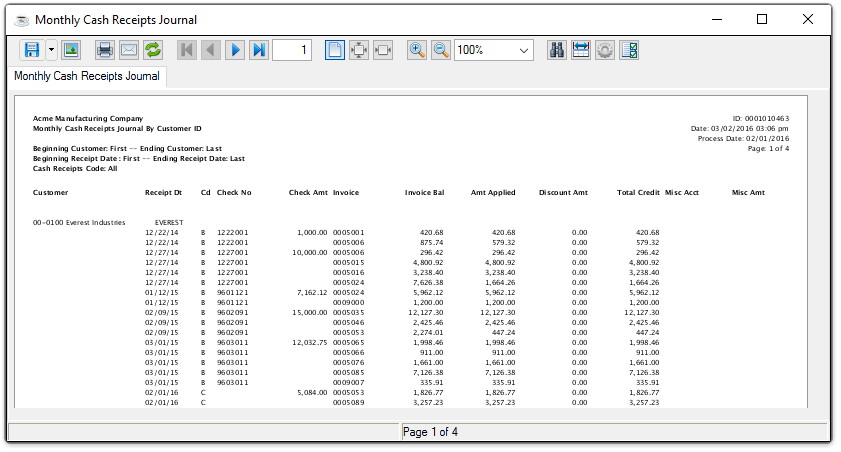
Sample Monthly Cash Receipts Journal
See Output Options.