Accounts Payable - Monthly Check Report
Function
Use the Monthly Check Report to list all vendor checks, manual checks, check reversals and void checks processed during the selected accounting period.
To access this task...
Select Monthly Check Report from the Period End Processing menu.
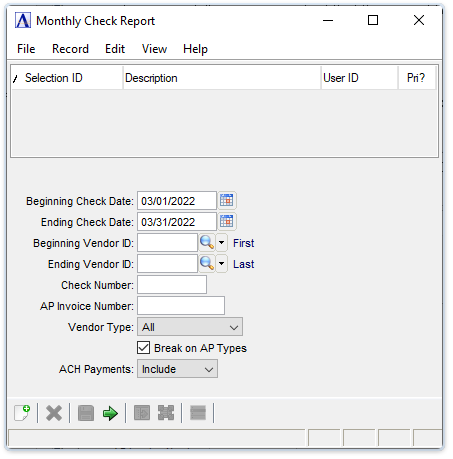
Monthly Check Report
About the Fields
In the Beginning/Ending Check Date fields...
-
Enter the desired beginning/ending check date for the report in mmddyyyy format.
-
Click
 to select
a date using the calendar tool.
to select
a date using the calendar tool.
In the Beginning/Ending Vendor ID fields...
-
Enter the desired beginning/ending vendor ID for the report.
-
Leave blank to select the first/last record.
-
Click
 to select from a list of existing vendor numbers.
In the Check Number field...
- Optionally enter a specific check number for the report.
In the AP Invoice Number field...
- Optionally enter a specific AP invoice number for the report.
From the Vendor Type dropdown...
-
Select All, Permanent, or Temporary from the dropdown list.
Break on AP Types checkbox...
Disabled unless Multiple AP Types is marked in AP Parameters.
-
Mark the box to insert breaks for each AP type.
-
Unmark the box to disable this feature.
From the ACH Payments dropdown...
-
Select Include to the electronic ACH payments in the report.
-
Select Exclude to not include the electronic ACH payments in the report.
-
Select Only to create a report showing only electronic ACH payments.
When done making selections...
-
Click
 to create the Monthly Check Report.
When Multiple AP Types is marked in AP Parameters, the report is grouped and sub totaled by accounts payable type.
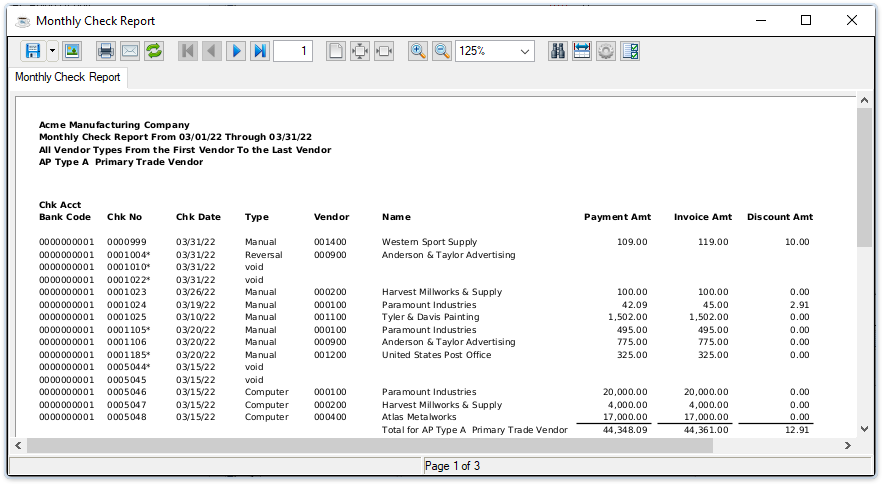
Sample Monthly Check Report
See Output Options.