Accounts Payable - Credit Card Master
Function
This task is used to identify credit cards used by the company.
To access this task...
Select Credit Card Master from the Inquiry and Maintenance menu.
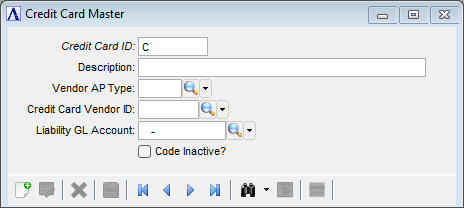
Credit Card Master
About the Fields
In the Credit Card ID field...
-
Enter a new or existing 7-character alphanumeric code to identify the credit card. The first character must be a capital "C".
For example "C1949", where the "C" is followed by the last 4 digits of the credit card number.
-
Click
 to select a Credit Card ID from a list of existing Credit Card ID records.
 -
Click the record navigating buttons;
 to view the first record,
  to view the previous record,
  to view the next record, and
  to view the last record.
In the Description field...
-
Enter up to 35 characters to describe the Credit Card.
In the Vendor AP Type field...
-
Enter the AP Type code used for the credit card vendor.
-
Click
 to select an AP Type code from a list of existing AP Types codes.
In the Credit Card Vendor ID field...
-
Enter an existing valid Vendor ID that identifies the credit card vendor.
-
Click
to select a Vendor ID from a list of existing Vendor IDs.
In the Liability GL Account field...
-
Enter the GL liability account to use for this Credit Card ID.
-
Click
to select a GL Account from a list of existing GL Accounts.
Code Inactive? checkbox...
-
Mark the box to render this Credit Card ID inactive.
-
Unmark the box to indicate that this is an active Credit Card ID.
When finished entering the credit card master information...
-
Click
 to save the record.
-
Click
 to clear the form and begin again.
-
Click
 to delete the selected Credit Card ID record.