AddonSoftware Administration - Postal State Codes
Function
The Postal State Codes maintenance task allows for the creation, modification and deletion of codes used throughout Addon to validate address State/Providence codes.
To access this task...
Select Postal State Codes from the Settings menu.
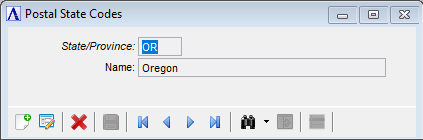
Postal State Codes
About the Fields
To enable edits to the form, click  .
.
In the State/Province field...
-
Enter a new or existing two-character state/province code.
-
Click
 to select from a list of existing state/province codes.
 -
Click the record navigation buttons;
 to view the first record,
  to view the previous record,
  to view the next record, and
  to view the last record.
In the Name field...
-
Enter up to 30 characters for the name of the state/province.
When finished making entries to the fields...
-
Click
 to save the new or modified code.
 -
Click
 to clear the form and begin again.